
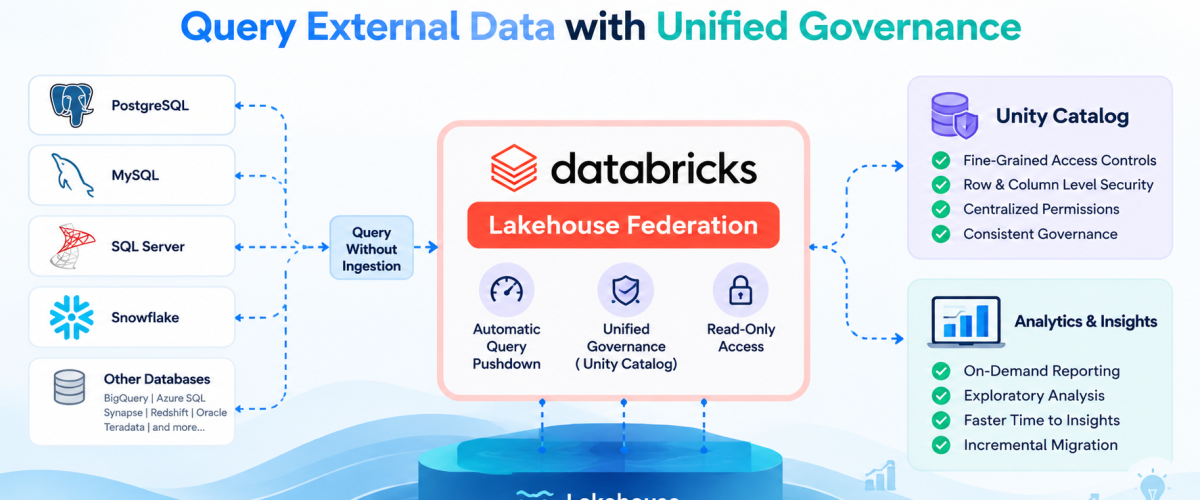
What if you could query your PostgreSQL, MySQL, Snowflake, or SQL Server databases directly from Databricks without moving any data? Lakehouse Federation makes this possible—allowing you to query external databases with minimal latency while maintaining unified governance through Unity Catalog, all without the complexity of building ETL pipelines.
What is Lakehouse Federation?
Lakehouse Federation is the Databricks query federation platform. It provides governed, read-only access to external data through Unity Catalog foreign catalogs, with automatic query pushdown and fine-grained access controls at the table level.
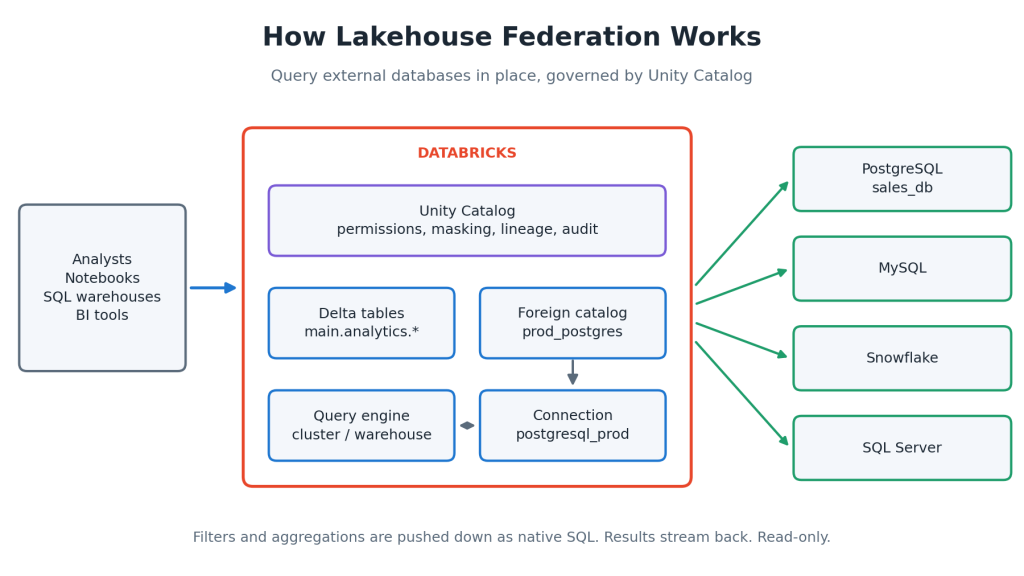
Instead of extracting data from operational systems, transforming it, and loading it into your lakehouse (traditional ETL), Lakehouse Federation lets you query data where it lives. The query is executed partially at the source database and partially in Databricks, with results streamed back to your workspace.
Key Capabilities:
- Query Without Ingestion: Access data directly from external databases without moving it to Databricks
- Automatic Query Pushdown: Databricks translates SQL queries into native SQL for the source database, executing filters and aggregations at the source for optimal performance
- Unified Governance: Unity Catalog manages permissions across both lakehouse data and federated sources from a single control plane
- Read-Only Access: Foreign catalogs provide secure, read-only access to external data sources
- Fine-Grained Access Controls: Apply row and column-level security policies consistently across external and internal data
Supported Data Sources:
Databricks Runtime includes bundled connectors for common databases such as PostgreSQL, SQL Server, MySQL, Snowflake, and Redshift. Additionally, Lakehouse Federation supports:
- Google BigQuery
- Azure SQL Database
- Azure Synapse
- Databricks-to-Databricks federation
- Teradata (via JDBC)
- Oracle (via generic JDBC with limited pushdown)
Why Use Lakehouse Federation?
Common Use Cases (from Databricks documentation):
- On-Demand Reporting: Query current operational data for reports without ETL delays
- Proof-of-Concept Work: Explore data before committing to full ingestion pipelines
- Exploratory Analysis: Test new ETL pipelines and analytics approaches with live data
- Incremental Migration: Query existing systems while gradually migrating to Unity Catalog
Query federation gets you to insights faster because you can query the data in place and avoid complex and time-consuming ETL processing.
Practical Implementation:
Prerequisites:
- Unity Catalog enabled in your workspace
- Network connectivity to external databases (VPC peering, PrivateLink, or allowlisted IPs)
- Database credentials with read permissions
- Databricks Runtime 13.3 LTS or higher (specific connectors may require newer versions)
Step 1: Create a Connection
A connection registers your external database with Unity Catalog:
					CREATE CONNECTION IF NOT EXISTS postgresql_prod
TYPE postgresql
OPTIONS (
  host 'production-db.company.com',
  port '5432',
  user 'databricks_readonly',
  password secret('dbx-secrets', 'postgres-password')
);
Verify the connection:
DESCRIBE CONNECTION postgresql_prod;
Step 2: Create a Foreign Catalog
A foreign catalog mirrors your external database:
					CREATE FOREIGN CATALOG IF NOT EXISTS prod_postgres
USING CONNECTION postgresql_prod
OPTIONS (
  database 'sales_db'
);
List all schemas:
SHOW SCHEMAS IN prod_postgres;
Step 3: Grant Permissions
Use Unity Catalog to manage access:
					GRANT USE CATALOG ON CATALOG prod_postgres TO `analytics_team`;
GRANT USE SCHEMA ON SCHEMA prod_postgres.public TO `analytics_team`;
GRANT SELECT ON SCHEMA prod_postgres.public TO `analytics_team`;
Step 4: Query Federated Data
Once configured, query federated tables like any other table:
					SELECT
  customer_id,
  SUM(order_total) as total_revenue
FROM prod_postgres.public.orders
WHERE order_date >= CURRENT_DATE - INTERVAL 7 DAYS
GROUP BY customer_id
ORDER BY total_revenue DESC
LIMIT 100;
Step 5: Join Federated Data with Delta Lake
Combine operational data with analytical models:
					from pyspark.sql import functions as F

# Read from Delta Lake (ML models)
customer_segments_df = spark.table("main.analytics.customer_segments")

# Read from PostgreSQL (current data)
live_orders_df = spark.table("prod_postgres.public.orders")

# Join federated and lakehouse data
enriched_orders = live_orders_df.alias("o") \
.join(
  customer_segments_df.alias("c"),
  F.col("o.customer_id") == F.col("c.customer_id"),
  "left"
) \
.select(
  "o.*",
  "c.segment",
  "c.lifetime_value",
  "c.churn_risk_score"
)

# Write to Delta Lake for caching or downstream processing
enriched_orders.write \
.format("delta") \
.mode("overwrite") \
.saveAsTable("main.analytics.enriched_orders")
Step 6: Monitor Query Performance
View federation query history:
					SELECT
  statement_id,
  statement_text,
  execution_duration_ms,
  produced_rows,
  read_bytes
FROM system.query.history
WHERE statement_text LIKE '%prod_postgres%'
ORDER BY execution_duration_ms DESC
LIMIT 20;
Step 7: Create Materialized Views for Optimization
For frequently accessed federated data, create materialized views:
					CREATE MATERIALIZED VIEW main.analytics.daily_sales_snapshot AS
SELECT
  DATE(order_date) as sale_date,
  product_id,
  SUM(quantity) as total_quantity,
  SUM(order_total) as total_revenue
FROM prod_postgres.public.orders
GROUP BY DATE(order_date), product_id;
Refresh the view manually or schedule via a Databricks Job:
					-- Manual refresh
REFRESH MATERIALIZED VIEW main.analytics.daily_sales_snapshot;
Query Optimization Best Practices:
Use Query Pushdown Effectively
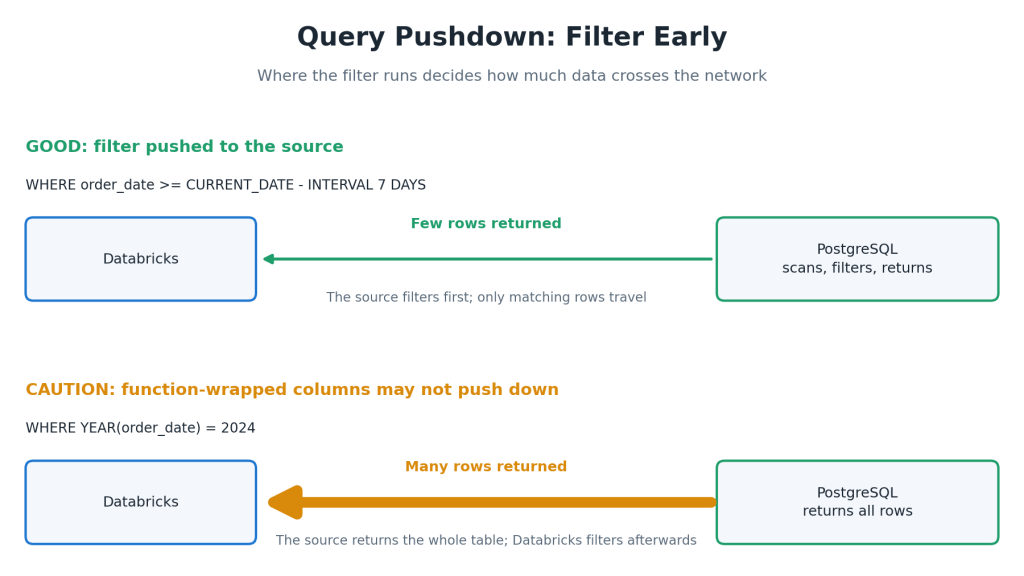
Databricks pushes WHERE clauses and aggregations on federated tables to the source database. Cross-source joins execute in Spark. Always filter early:
GOOD – Filter pushed to source database:
					SELECT * FROM prod_postgres.public.orders
WHERE order_date >= CURRENT_DATE - INTERVAL 7 DAYS;
CAUTION – Function-wrapped columns may not push down:
					SELECT * FROM prod_postgres.public.orders
WHERE YEAR(order_date) = 2024;
-- Filters like YEAR() may not be pushed; prefer date range filters
Use EXPLAIN to Verify Execution
					EXPLAIN EXTENDED
SELECT * FROM prod_postgres.public.orders WHERE status = 'COMPLETED';
Note: If a predicate cannot be pushed down, the query executed on the remote database engine excludes the predicate, so filtering has to be done using Databricks Runtime.
Limit Result Set Size
Federated queries transfer data over the network. Use targeted columns and LIMIT clauses:
					-- Minimize data transfer (example uses dates; adjust for your timeline)
SELECT order_id, customer_id, order_date
FROM prod_postgres.public.orders
WHERE order_date >= CURRENT_DATE - INTERVAL 7 DAYS
LIMIT 1000;
Materialize Frequently Accessed Data
For data queried repeatedly, cache it in Delta Lake using materialized views rather than querying the source each time.
Monitor Source Database Performance
When using read replicas, monitor replica performance to ensure queries don’t impact operational systems.
Unity Catalog Governance for Federated Data:
Lakehouse Federation provides governed, read-only access to external data through Unity Catalog foreign catalogs, with automatic query pushdown and fine-grained access controls at the table level.
Apply these governance features to federated data:
- Table-Level Permissions: Grant SELECT, USAGE at the table level
- Column-Level Masking: Mask sensitive columns for specific users/groups
- Row-Level Filters: Apply business logic to restrict row visibility
- Audit and Lineage: Track data access and usage across external sources
- Tags: Classify and discover federated data alongside lakehouse data
Example: Apply Access Control
					-- Grant schema-level access
GRANT USE SCHEMA ON SCHEMA prod_postgres.public TO `analysts`;

-- Restrict table access
GRANT SELECT ON TABLE prod_postgres.public.orders TO `finance_team`;
REVOKE SELECT ON TABLE prod_postgres.public.customers FROM `analysts`;
Real-World Use Cases:
The following examples illustrate how Lakehouse Federation can be applied in different industries. They are intended to demonstrate architectural patterns rather than complete production implementations.
Banking and Financial Services
Financial institutions often maintain live transaction data in operational databases while storing historical customer profiles, transaction history, and analytical datasets in Delta Lake.
With Lakehouse Federation, analysts can query recent transactions directly from the operational database while combining them with historical data stored in the Lakehouse. This allows teams to investigate recent activity without first ingesting the operational data into Delta tables.
For example, recent transactions can be analyzed alongside historical customer information to support fraud investigation workflows, operational reporting, or other analytical use cases.
Note: The following SQL example is illustrative. Replace <model_endpoint> with the name of your deployed Databricks Model Serving endpoint.
					WITH live_transactions AS (
    SELECT *
    FROM prod_postgres.banking.transactions
    WHERE transaction_time >= CURRENT_TIMESTAMP - INTERVAL 5 MINUTES
)
SELECT
    transaction_id,
    ai_query(
        '<model_endpoint>',
        CONCAT(
            'Analyze this transaction for potential fraud: ',
            CAST(transaction_features AS STRING)
        )
    ) AS fraud_analysis
FROM live_transactions;
This example demonstrates how operational data can be queried through Lakehouse Federation while using Databricks AI capabilities to assist with transaction analysis. Depending on your use case, the results can support analyst investigations or downstream workflows.
Retail Inventory Optimization
Retail organizations often maintain current inventory information in operational databases while storing demand forecasts, historical sales, and analytical models in Delta Lake.
Using Lakehouse Federation, analysts can query current inventory together with historical demand forecasts without duplicating operational inventory tables. This enables inventory planning and replenishment analysis using both operational and analytical datasets from a single platform.
					current_inventory = spark.table("prod_mysql.retail.inventory")

demand_forecast = spark.table("main.analytics.demand_forecast")

restock_recommendations = (
    current_inventory
        .join(demand_forecast, ["product_id", "store_id"])
        .filter("current_stock < forecasted_demand_7d * 0.3")
        .select("store_id", "product_id", "restock_quantity")
)
This approach allows inventory planners to analyze live operational inventory alongside historical forecasting data without first ingesting the operational inventory data into Delta Lake.
Manufacturing Operations
Manufacturing organizations often store production schedules and ERP information in operational databases while maintaining IoT telemetry and historical analytics in Delta Lake.
Lakehouse Federation enables engineers to query production schedules together with machine telemetry, providing a unified view of operational and analytical data without replicating operational ERP tables.
					SELECT
    m.machine_id,
    m.last_maintenance_date,
    i.avg_temperature_24h,
    i.vibration_anomaly_score,
    e.scheduled_production_hours,
    CASE
        WHEN i.vibration_anomaly_score > 0.8
             AND e.scheduled_production_hours > 20

 THEN 'URGENT_MAINTENANCE'
        ELSE 'NORMAL'
    END AS maintenance_priority
FROM main.iot.machine_telemetry_agg i
JOIN prod_sqlserver.erp.machines m
    ON i.machine_id = m.machine_id
JOIN prod_sqlserver.erp.production_schedule e
    ON m.machine_id = e.machine_id
WHERE i.processing_date = CURRENT_DATE;
By combining operational ERP data with IoT telemetry in a single query, engineering teams can analyze equipment health alongside current production schedules without requiring a dedicated ingestion pipeline for this analytical scenario.
Federation vs. ETL: When to Use Which
Use Case | Federation | ETL |
Ad-hoc, exploratory queries | ✓ | – |
Real-time operational reports | ✓ | – |
Proof-of-concept analysis | ✓ | – |
High-volume data movement | – | ✓ |
Complex transformations | – | ✓ |
Performance-critical workloads | – | ✓ |
Frequently accessed data (>10x/day) | △ (cache with MVs) | ✓ |
Federation as Part of Your Data Architecture:
Lakehouse Federation complements, rather than replaces, traditional ETL:
- Hot Data: Frequently accessed analytical data lives in Delta Lake for optimal performance
- Warm Data: Operational data queried on-demand through federation
- Cold Data: Historical and compliance data archived in object storage
This hybrid approach gives you the performance benefits of Delta Lake where it matters most, while maintaining the flexibility of federation for exploratory and ad-hoc workloads.
Monitoring Federation Queries:
Use Databricks query history and SQL warehouse dashboards to monitor:
- Query duration and resource consumption
- Data transferred across the network
- Push-down effectiveness
- Source database query patterns
Getting Started:
- Identify an external database with data suitable for federation (operational systems, analytical databases, PoCs)
- Choose query federation for ad hoc reporting or proof-of-concept work on your ETL pipelines.
- Create a connection and foreign catalog
- Start with simple queries to understand performance characteristics
- Optimize using materialized views and query pushdown
- Scale to additional use cases as needed
Conclusion:
Lakehouse Federation enables you to query across fragmented data landscapes and gain insights from operational systems without the time and complexity of building ETL pipelines. Federation works alongside Unity Catalog to provide unified governance across these dispersed data sources. For the right use cases—operational reporting, proof-of-concept analysis, and exploratory workloads—federation delivers significant value.
When combined with traditional ETL and Delta Lake, Lakehouse Federation enables a truly flexible, governed, and performant data architecture across your SQL-based data sources and Delta Lake analytics.
For more information, see the Lakehouse Federation documentation on Databricks.
References:
- Databricks Official Documentation: Lakehouse Federation
- Databricks Blog: Announcing General Availability of Lakehouse Federation
- Databricks Documentation: Lakehouse Federation Performance Recommendations
- Databricks Documentation: Row Filters and Column Masks