
Modern data architectures increasingly rely on real-time data synchronization between transactional systems and analytical platforms. Postgres databases power countless production applications, but the data they contain often remains siloed from the broader data lakehouse — leaving analytics teams working with stale exports or complex custom pipelines.
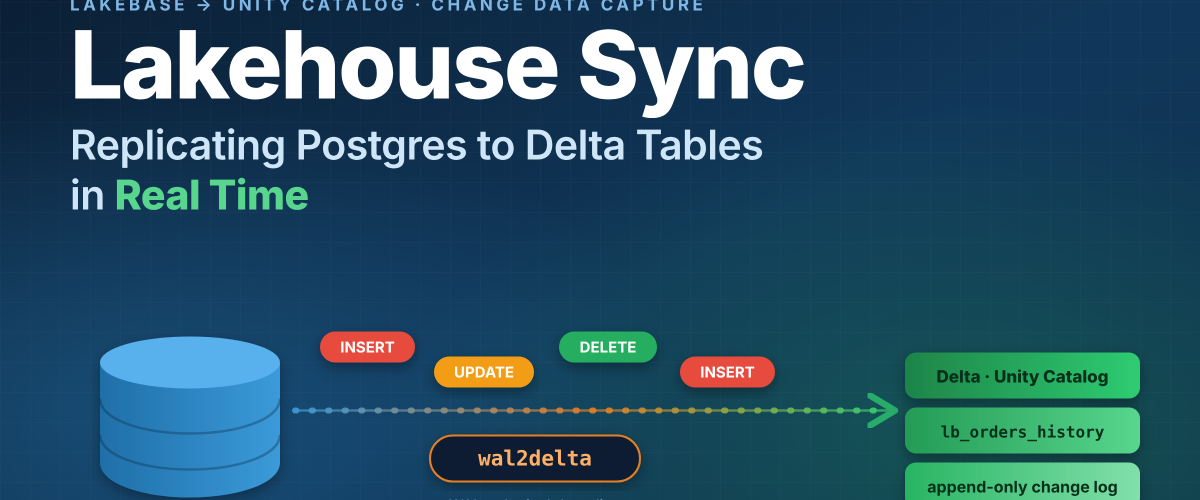
Databricks addresses this with Lakehouse Sync, a native capability of Lakebase (Databricks’ managed Postgres service) currently in public preview. Lakehouse Sync continuously replicates Lakebase Postgres tables into Unity Catalog-managed Delta tables using Change Data Capture (CDC). Every INSERT, UPDATE, and DELETE committed to your Postgres tables is captured and written to the lakehouse automatically, without external pipelines, connectors, or dedicated compute to manage.
In this blog, we’ll explore what Lakehouse Sync is, how CDC-based replication works under the hood, how it compares to traditional approaches, how it fits into the broader shift away from tightly coupled compute and storage, and when to use it in your architecture.
What Is Lakebase?
Before diving into Lakehouse Sync, it helps to understand the platform it runs on. Lakebase is Databricks’ fully managed, Postgres-compatible operational database that lives alongside the lakehouse on the Databricks Data Intelligence Platform. Built on a cloud-native, serverless storage architecture that decouples compute from storage at the database layer, Lakebase makes several of its headline capabilities possible. Lakebase:
- Autoscales compute up and down based on workload
- Scales to zero when not in use
- Supports branching and point-in-time restore
- Integrates natively with Unity Catalog governance
- Reduces sync overhead through native CDC replication into Delta
With Lakebase, your operational database and analytical lakehouse aren’t two fully separate systems that need to be stitched together — they share the same open storage foundation, which is what allows sync to become a native database property rather than a bolted-on pipeline.
From Tightly Coupled to Nimble: How Compute and Storage Have Changed
It’s worth stepping back to look at why this architecture is even possible now. Traditional operational databases — whether self-managed Postgres, RDS, or most conventional OLTP systems — tightly couple compute and storage. The database engine and its data files live on the same instance or attached volume. That coupling has real consequences:
- Scaling compute (CPU/memory) usually means resizing the whole instance, often with downtime or failover
- Storage and compute are provisioned and billed together, so idle databases still cost money
- Replicating data elsewhere requires reading it back out through the database engine — via WAL shipping, logical replication, or a separate CDC tool — because storage isn’t independently accessible
- Branching or cloning a database for testing means copying the underlying storage, which is slow and expensive at scale
The industry has been moving toward a more nimble model in which compute and storage are decoupled: storage lives in cheap, durable object storage, and stateless compute nodes attach to it on demand. This pattern is well established on the analytics side (it’s the core idea behind the lakehouse itself), and it’s now arriving in the operational database tier. Lakebase is a direct expression of this shift — because Lakebase and Unity Catalog share the same underlying open storage, capabilities that used to require dedicated infrastructure become native properties of the platform:
- Autoscaling and scale-to-zero, because compute can be spun up or down independently of the data it operates on
- Instant branching and restore, because branching storage is far cheaper than branching a live database instance
- Native CDC sync to Delta, because both sides of the sync already sit on the same storage layer instead of requiring data to be shipped between two disconnected systems
This is the architectural reason Lakehouse Sync can be a lightweight, built-in feature instead of an external pipeline: it isn’t moving data between two tightly coupled, siloed systems — it’s decoding the WAL of a database that was already designed with decoupled, lakehouse-native storage in mind.
The Traditional Challenge: Syncing Postgres with Your Lakehouse
Before native sync options existed, data teams had to choose between several painful approaches to get Postgres data into Delta Lake:
Approach | How It Works | Key Pain Points |
Scheduled ETL / Batch Exports | pg_dump or COPY to S3, then COPY INTO Delta | High latency, full-table scans, data freshness in hours |
Custom CDC with Debezium | WAL reader → Kafka → Spark Structured Streaming → Delta | High infra complexity, ops burden, failure modes |
Third-Party Ingestion Tools | Fivetran, Airbyte, and similar connectors | Licensing cost, limited control, schema drift issues |
Manual MERGE Logic | Watermark-based incremental loads with hand-written SQL | Fragile, misses deletes, hard to maintain at scale |
Each of these approaches requires meaningful engineering investment and introduces reliability risk. Lakehouse Sync reduces much of this by building CDC replication directly into Lakebase — without a separate CDC stack to deploy or operate.
How Lakehouse Sync Works
Lakehouse Sync is powered by wal2delta, a Postgres extension that runs inside Lakebase compute. It uses logical decoding on the Postgres Write-Ahead Log (WAL) — the same underlying mechanism that powers native Postgres replication — as its CDC source.
The CDC Pipeline
Here is the end-to-end flow of how a change travels from your Postgres table to Delta Lake:
- Application writes to Lakebase Postgres — An INSERT, UPDATE, or DELETE is committed.
- WAL captures the change — Postgres records the operation in the Write-Ahead Log before the commit completes.
- wal2delta decodes the WAL — The extension consumes WAL events via logical decoding as a stream of change records (insert/update/delete with row values).
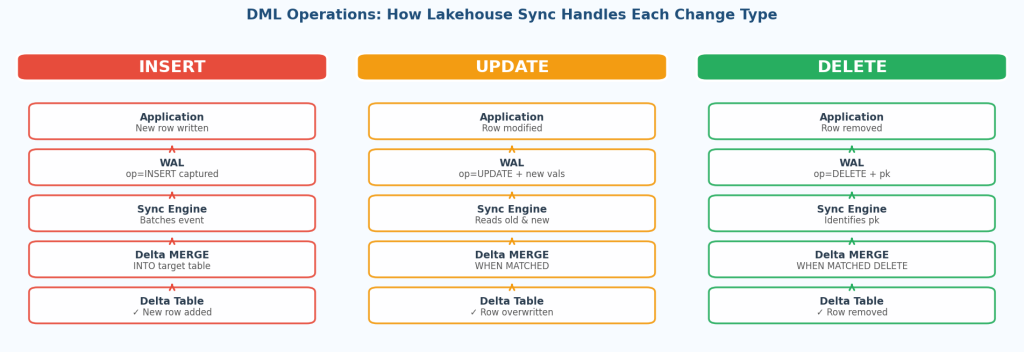
- Changes are written as history — Lakehouse Sync appends each change as a new row to the target Delta table, preserving every prior version as an immutable change log rather than overwriting existing rows.
- Delta table reflects the change log — The Unity Catalog Delta table (named lb_<table_name>_history) accumulates a full, append-only history of every insert, update, and delete, with ACID guarantees and time-travel support.
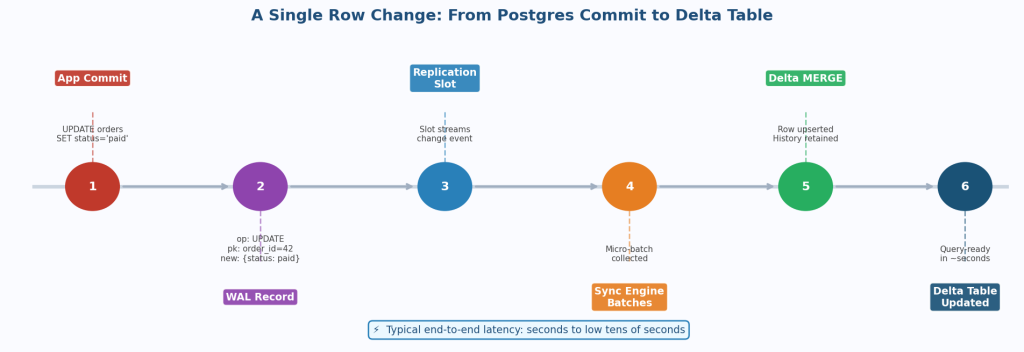
This pipeline runs continuously in the background. There is no scheduler, no polling interval, and no manual trigger required — but because sync writes an append-only history rather than mirroring current state, downstream consumers that need the latest row per key typically query the most recent record per primary key or build a lightweight view on top of the history table.
Key Features of Lakehouse Sync
Feature | What It Does |
WAL-Based CDC | Captures every INSERT, UPDATE, DELETE from the Postgres WAL via logical decoding, in near real time |
Native Delta Integration | Writes directly to Unity Catalog-managed Delta tables — no intermediate landing zones or staging layers. |
Full DML Support | Captures inserts, updates, and deletes as an append-only change log, not just append-only ingestion of new rows |
Schema Sync | Detects and propagates additive schema changes (e.g. new columns) automatically |
Unity Catalog Governance | Replicated Delta tables inherit Unity Catalog permissions, lineage, and tags. |
Immutable Change History | Every change is preserved as a new row in an append-only CDC change log, giving a complete, immutable audit trail rather than a single current-state snapshot. |
Minimal Source Impact | WAL decoding runs inside Lakebase compute and is designed to minimize impact on operational query performance |
Architecture Overview
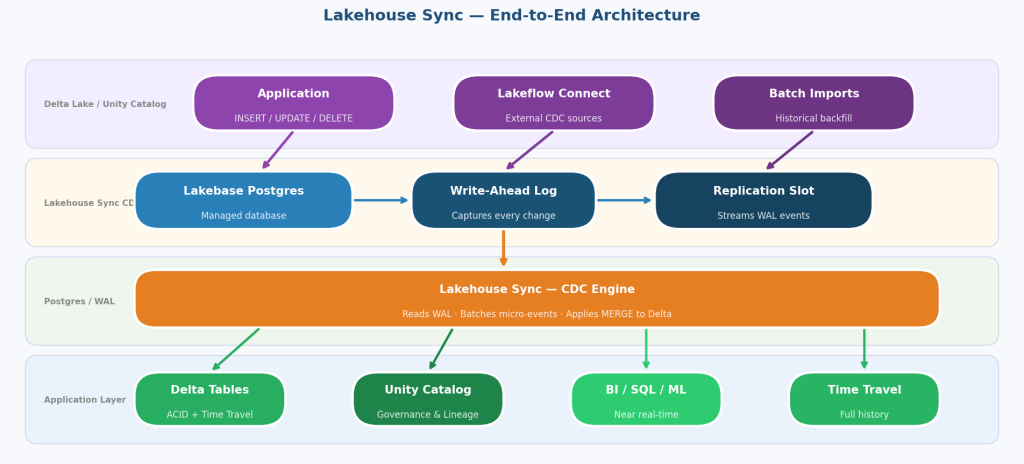
A typical Lakehouse Sync deployment fits cleanly into a modern lakehouse architecture:
Source Layer — Lakebase Postgres: Your operational applications write to Lakebase tables. This is your system of record.
Sync Layer — Lakehouse Sync (CDC): Built into Lakebase via the wal2delta extension, it decodes the WAL and writes changes to Delta. No separate service to deploy or manage.
Storage Layer — Delta Lake on Unity Catalog: Replicated history tables live here with full ACID guarantees, time travel, and lakehouse governance.
Analytics Layer — Databricks SQL / Notebooks / BI Tools: Analysts and data scientists query the Delta tables with near real-time freshness, without touching the operational database. Databricks SQL serverless warehouses deliver fast, elastic queries on these continuously updated tables, and AI Functions such as ai_query() and ai_forecast() can run directly on live operational data.
This architecture achieves read/write separation — operational workloads run on Lakebase Postgres, analytical workloads run on Delta Lake, and Lakehouse Sync keeps them continuously connected.
Setting Up Lakehouse Sync
Enabling Lakehouse Sync requires minimal configuration — there are no connectors to install, no Kafka clusters to provision, and no Spark jobs to write. A workspace admin enables the feature once for the workspace.
Step 1: Create a Lakebase Autoscaling Project
In the Databricks workspace, navigate to Lakebase and create a new Lakebase Autoscaling project running Postgres 17. New projects are created with autoscaling and scale-to-zero enabled by default.
Step 2: Start Lakehouse Sync on a Branch
From the Lakebase branch overview, open the Lakehouse Sync tab and start sync. You will specify:
- The source Postgres schema — Lakehouse Sync works with the default databricks_postgres database in your Lakebase project, keeping operational data co-located on the same platform
- The destination Unity Catalog catalog and schema — destination tables are automatically created as lb_<table_name>_history.
Step 3: Monitor Sync Status
The Lakehouse Sync tab shows each table’s status (Syncing or Snapshotting), the committed LSN, and the last sync time. You can also query sync status directly from Postgres via SELECT * FROM wal2delta.tables.
Step 4: Query the Delta Table
Once sync is running, the Delta history table in Unity Catalog is queryable via Databricks SQL, notebooks, or any connected BI tool, typically with replication lag in the range of seconds under standard workloads. Each history row carries change metadata (_pg_change_type, _pg_lsn, _pg_xid, _ timestamp,p and _sort_by), which makes it straightforward to derive the current state of any table.
To get the latest state per primary key with Databricks SQL, rank each key’s changes by _sort_by and drop deleted rows (replace id with your primary key):
					CREATE OR REPLACE VIEW main.sales.orders_current AS
SELECT * EXCEPT (rn)
FROM (
  SELECT *,
         ROW_NUMBER() OVER (PARTITION BY id ORDER BY _sort_by DESC) AS rn
  FROM main.sales.lb_orders_history
) t
WHERE rn = 1
  AND _pg_change_type NOT IN ('delete', 'update_preimage');
Because the history table is a Delta table, it can also be consumed incrementally with Structured Streaming from a notebook or job, for example to feed downstream silver tables or feature pipelines:
					changes = (spark.readStream
    .table("main.sales.lb_orders_history")
    .filter("_pg_change_type IN ('insert', 'update_postimage', 'delete')"))

(changes.writeStream
    .option("checkpointLocation", "/Volumes/main/sales/checkpoints/orders_changes")
    .trigger(availableNow=True)
    .toTable("main.sales.orders_changes_silver"))
Note: table names, catalog, schema, and checkpoint paths above are illustrative; adjust them to your environment.
Lakehouse Sync vs. Traditional CDC Alternatives
Dimension | Custom Debezium + Kafka | Batch ETL | Lakehouse Sync |
Setup Time | Days to weeks | Hours to days | Minutes |
Infra to Manage | Kafka, connectors, schema registry | Orchestrator, compute | None — built into Lakebase compute |
Latency | Seconds (with tuning) | Hours (batch window) | Seconds |
Handles Deletes | Yes (with configuration) | No (append-only) | Yes, as change events |
Schema Evolution | Manual | Manual | Automatic (additive changes) |
Cost | High (Kafka infra + engineering) | Medium | Low — no external Kafka or connector licensing; billed as part of Lakebase compute usage |
Governance | External tooling needed | External tooling needed | Unity Catalog native |
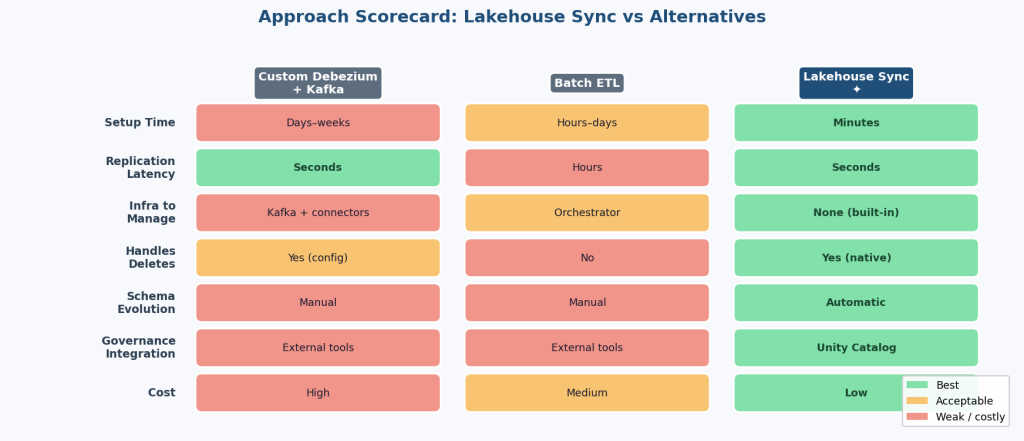
For teams already running Lakebase, Lakehouse Sync generally reduces infrastructure complexity and lowers latency compared with external CDC stacks, while keeping governance in Unity Catalog from the first row.
When to Use Lakehouse Sync
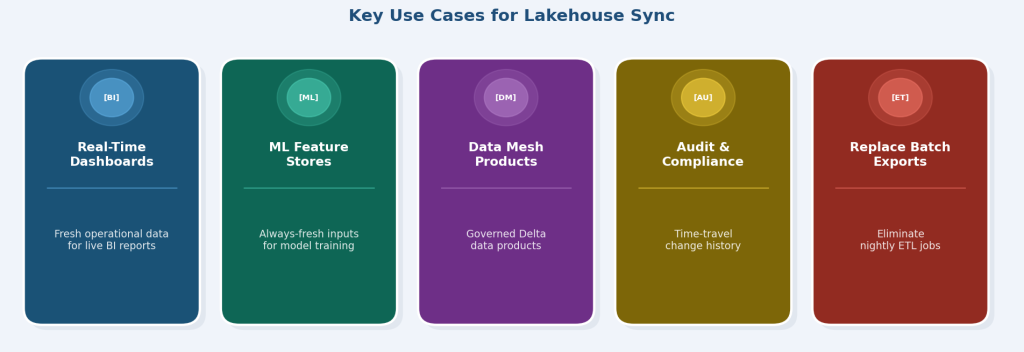
Lakehouse Sync is a strong fit whenever you need fresh Postgres data available for analytical workloads in the lakehouse. Common use cases include:
1. Real-Time Operational Dashboards
Replicate order management, inventory, or CRM Postgres tables to Delta and power live dashboards on Databricks SQL serverless warehouses, which return fast results on continuously updated tables without running analytical queries against the production database. Teams can go further with AI Functions such as ai_query() and ai_forecast() applied to live operational data, for example forecasting demand directly from the latest orders.
2. Machine Learning Feature Stores
Feed ML pipelines with fresh Postgres data so model inputs reflect the latest application state, with no separate ingestion pipeline. Synced tables can be used with Databricks Feature Engineering in Unity Catalog to build governed, reusable features, and models trained and tracked with MLflow can be retrained on up-to-date operational data. The same governance and lineage that cover your analytics tables then cover your ML inputs.
3. Data Mesh / Domain Data Products
In a data mesh architecture, teams can expose their Lakebase Postgres tables as governed Delta data products in Unity Catalog, kept fresh by Lakehouse Sync.
4. Audit and Compliance
Because Lakehouse Sync writes an append-only CDC change log, every change is preserved — making it a strong foundation for audit logs and compliance reporting where you need to reconstruct the state of a record at a given point in time.
5. Replacing Batch Exports
If your team currently runs nightly pg_dump exports to S3 followed by COPY INTO Delta, Lakehouse Sync can replace that pipeline with a continuously updated Delta history table and no batch window.
6. Point-in-Time Reconstruction with Delta Time Travel
The append-only change history pairs naturally with Delta time travel. You can rebuild the exact state of any Postgres record, or an entire table, as of a given timestamp or table version, whether to investigate a data issue, reproduce a past report, or answer an auditor’s question. Traditional CDC setups that overwrite current state cannot offer this without extra snapshot infrastructure.
SELECT * FROM main.sales.lb_orders_history TIMESTAMP AS OF ‘2026-09-30 00:00:00’
WHERE id = 1042;
7. Sharing Data Externally with Delta Sharing
Once Postgres data lands in Delta, it can be shared with partners, customers, or other business units through Delta Sharing, with no data copies and no separate export jobs. Recipients get governed, up-to-date access, even if they are not on Databricks.
Architecture Considerations
Lakehouse Sync is designed around a clear, well-defined scope. A few points are worth keeping in mind as you plan your architecture:
- Enablement: a workspace admin enables Lakehouse Sync once for the workspace, and capabilities continue to evolve, so check the latest Databricks documentation as you plan your rollout.
- Source database: Lakehouse Sync works with the default Lakebase Postgres database (databricks_postgres) within a Lakebase Autoscaling project, keeping your operational data co-located on the same platform.
- Append-only change history: Delta tables receive a full change history (lb_<table_name>_history), giving you every version of every row. Consumers who want the current state can use a simple view with the latest row per key, as shown earlier.
- Unity Catalog destinations: Lakehouse Sync targets Unity Catalog catalogs backed by dedicated storage locations, giving you maximum control over governance and data placement.
- Schema evolution: additive changes, such as new columns, propagate automatically; other schema changes can be handled with a planned, manual step.
With these points in mind, Lakehouse Sync fits a wide range of operational-to-analytical use cases and is simple to evaluate early in your design.
Conclusion
Lakehouse Sync reflects a broader shift in how operational and analytical systems relate to each other. By building CDC replication directly into Lakebase — enabled by the same decoupled compute-and-storage architecture that gives Lakebase its autoscaling and branching capabilities — Databricks is making real-time Postgres-to-Delta replication accessible without a dedicated CDC stack or platform engineering team.
Key takeaways:
- Lakehouse Sync uses WAL-based CDC, via the wal2delta extension, for low-latency, continuous replication
- It captures full DML — inserts, updates, and deletes — as an append-only CDC change log, with automatic additive schema sync
- Replicated Delta tables integrate natively with Unity Catalog governance, time travel, Databricks SQL serverless, ML pipelines, and Delta Sharing.
- The shift from tightly coupled to decoupled compute and storage is what makes native, low-overhead sync possible in the first place
- It is a strong fit for teams on Lakebase that need fresh Postgres data in their lakehouse, with no separate ingestion stack to run.
As Lakebase matures, Lakehouse Sync is well-positioned to become a standard pattern for operational-to-analytical data integration, reducing the need for fragile, high-maintenance CDC pipelines that have burdened data teams for years.