
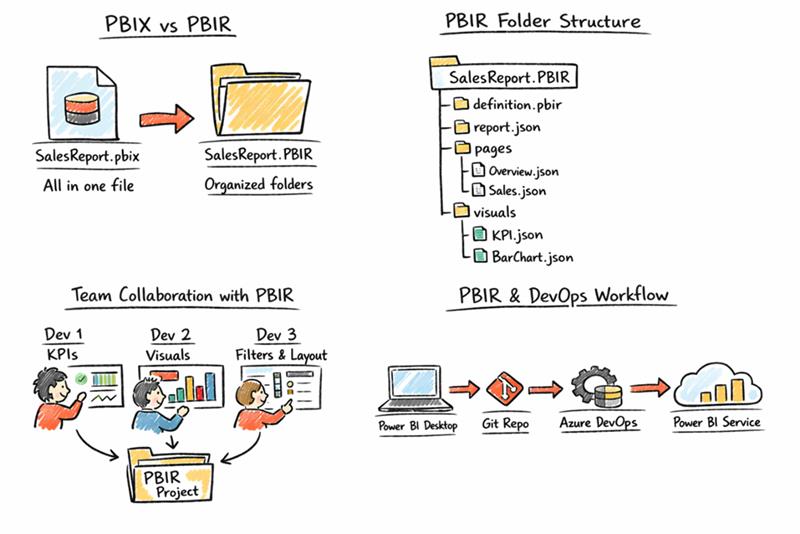
Microsoft introduced PBIR (Power BI Project – Report format) to modernize how Power BI reports are developed, especially in team and enterprise environments.
PBIR brings structure, transparency, and collaboration into Power BI without changing how reports look or behave for business users.
What is PBIR?
PBIR is a new way of saving Power BI reports.
Traditionally, Power BI reports were saved as a single .pbix file. While this works well for individual development, it becomes difficult when multiple developers need to work on the same report.
PBIR solves this by saving the report as a folder-based project, where each part of the report is stored separately.
Simple analogy:
- PBIX → One packed suitcase
- PBIR → Organized folders inside a cabinet
Why PBIR Was Introduced:
As Power BI usage grew in enterprise environments, teams needed:
- Version control using Git
- Parallel development
- CI/CD pipelines
- Clear visibility into report changes
The PBIX format is binary, which makes it hard to track changes or resolve conflicts. PBIR addresses this by breaking the report into text-based (JSON) files that can be easily tracked and reviewed.
What’s Inside a PBIR Project?
A PBIR project contains multiple JSON files representing:
- Report definition
- Pages
- Visuals
- Filters and layout
Because these files are human-readable:
- Git can clearly show what changed.
- Code reviews become meaningful.
- Merging changes is easier.
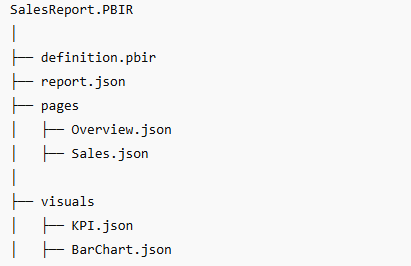
PBIR Folder Structure (Inside View)
Simple folder-tree diagram
PBIR vs PBIX – Simple Comparison
Feature | PBIX | PBIR |
File Structure | Single binary file | Folder-based project |
Readability | Not human-readable | Human-readable (JSON) |
Version Control | Limited | Git-friendly |
Team Collaboration | Difficult | Smooth |
Change Tracking | Not transparent | Clear and granular |
CI/CD Support | Minimal | Strong |
Best Use Case | Individual or small reports | Team & enterprise reports |
In short:
- PBIX is good for quick or personal work.
- PBIR is designed for scalable, team-based development.
Real-World Example: PBIR in a Team Scenario
Consider a Power BI team building a Sales Dashboard.
- One developer updates the KPI logic
- Another works on report visuals
- A third adjusts filters and page layout.
With PBIX, only one person can safely work at a time, and Git only shows that the PBIX file changed—without details.
With PBIR, each developer works on different report components. Changes are committed as separate files, making it clear which page or visual was modified. This reduces conflicts and enables smoother collaboration and deployments.
Does PBIR Affect Business Users?
No. Reports published using PBIR look the same in Power BI Service. PBIR improves the development and maintenance process, not the end-user experience.
When Should You Use PBIR?
PBIR is recommended when:
- Multiple developers work on the same report.
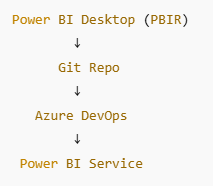
- Git, Azure DevOps, or GitHub is used.
- CI/CD pipelines are required.
- Reports are enterprise or long-term assets.
PBIX is still suitable for ad-hoc analysis or single-developer reports.
Conclusion:
PBIR bridges the gap between Power BI development and modern software engineering practices. By enabling version control, collaboration, and DevOps workflows, PBIR makes Power BI report development more scalable and maintainable—without impacting business users.