
The world of data analytics is evolving faster than ever. As organizations deal with growing volumes of structured and unstructured data, the need for a unified, scalable, and intelligent analytics platform has become critical.
Microsoft Fabric is response to this challenge, a comprehensive, end-to-end analytics solution that integrates data engineering, data science, real-time analytics, and business intelligence into one unified SaaS platform.
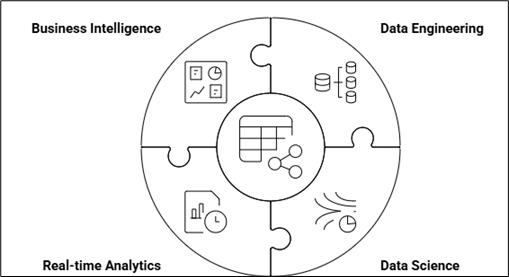
Microsoft Fabric Architecture
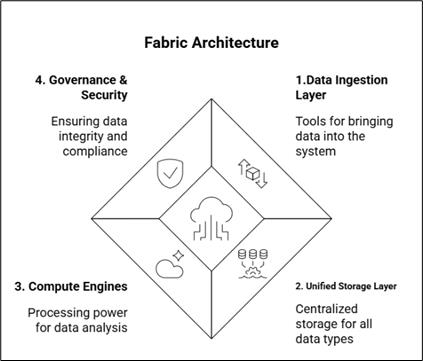
The architecture can be understood in four key layers:
A. Data Ingestion Layer:
This is the layer where data enters Fabric. Data may come from on-prem systems, cloud platforms, business apps, IoT devices, or streaming sources.
Below are some tools and features of the Data Ingestion Layer:
- Data Factory Pipelines: For orchestrating and automating ETL/ELT workflows.
- Dataflows Gen2: For transformation using a no-code Power Query interface.
- Event Streams / Real-time connectors: For IoT and streaming telemetry.
- Pre-built connectors: 150+ sources, including SQL, Salesforce, SAP, APIs, AWS, GCP, Oracle, etc.
Fabric supports both batch and real-time streaming ingestion.
B. Unified Storage Layer – OneLake
OneLake is the single data lake for the entire organization.
Key characteristics of OneLake:
- Built on ADLS Gen2
- Uses the Delta Lake open file format (parquet + transaction log)
- All workloads read and write to the same data, which removes duplication
- Supports Shortcuts to link external cloud storage without copying data
(Azure, AWS S3, and Google Cloud Storage)
C.Compute & Processing Layer
Fabric includes multiple compute engines, but they all operate on data stored in OneLake.
Compute Engine | Workload |
Spark Engine | Data Engineering & Data Science |
SQL Warehouse Engine | Data Warehousing |
Kusto Engine (KQL) | Real-Time Analytics |
Power BI Engine (VertiPaq) | BI / Semantic Models |
D. Governance, Security & Compliance Layer
Fabric integrates deeply with Microsoft Purview, providing:
- Data cataloging and classification
- Automatic data lineage tracking
- Role-based access control (RBAC)
- Row-level & column-level security
- Audit and compliance enforcement
These policies apply once and are inherited across all workloads in Fabric, ensuring trust and security at scale.
Fabric Capacity and Licensing Model
Fabric Capacity Units (F-SKUs)
Fabric capacity is measured using Fabric Capacity Units (FCUs), also known as F-SKUs.
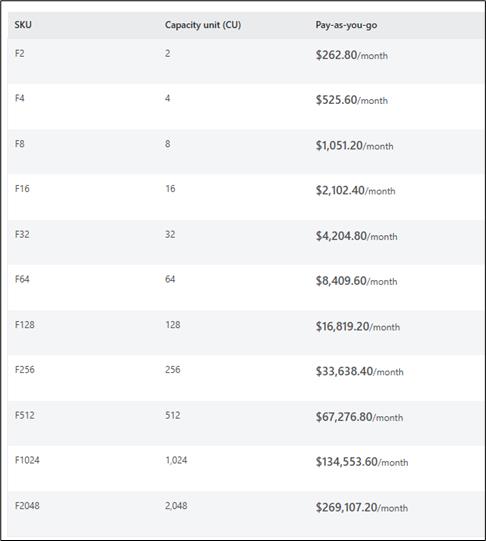
Every workload, Data Factory, SQL Warehouse, Spark, Power BI, etc., consumes the same pool of capacity, making cost predictable and easier to manage.
Business Challenge
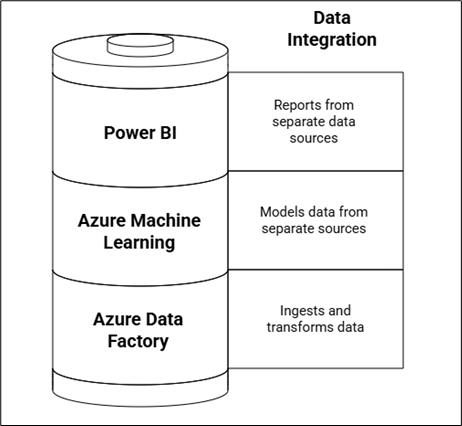
Let us consider a typical enterprise data scenario before Fabric. An organization may have:
- Data stored in multiple systems — ERP, CRM, SQL databases, data lakes, and cloud storage.
- Data engineers working in Azure Data Factory or Synapse to ingest and transform data.
- Data scientists using Azure Machine Learning or Databricks for modeling.
- Power BI developers are creating reports and dashboards from separate data sources.
This fragmented environment often leads to:
- Complex data pipelines with multiple tools and environments.
- Duplication of data across systems.
- Delayed insights because of data movement and refresh cycles.
High maintenance overhead due to disconnected services and security layers.
Business Use Case
Imagine a retail organization that wants a unified view of its business across stores, online sales, and customer engagement channels.
The company faces challenges such as:
- Data scattered across SQL servers, Azure Blob Storage, and third-party APIs.
- Slow refresh times and inconsistent transformations in Power BI datasets.
- Difficulty combining operational data with AI-driven customer segmentation models.
- Lack of a single, governed environment for all analytics teams.
Proposed Solution Using Microsoft Fabric
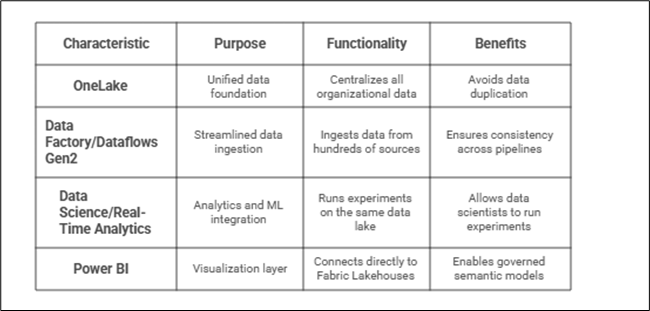
Unified Data Foundation: OneLake
Microsoft Fabric introduces OneLake as a single enterprise-grade data lake that acts as the foundation for all workloads.
- Similar to how OneDrive works for files, OneLake centralizes all organizational data.
- Power BI datasets can directly connect to tables in OneLake, avoiding data duplication.
- Security and governance are managed consistently across all data assets.
Streamlined Data Ingestion and Transformation
With Data Factory and Dataflows Gen2, data engineers can easily ingest data from hundreds of sources into OneLake.
- Dataflows Gen2 allows transformations using familiar Power Query interfaces.
- Reusable transformation logic ensures consistency across Power BI and Fabric pipelines.
- Pipelines can be automated with scheduling, dependencies, and monitoring in one place.
Analytics and Machine Learning Integration
Fabric supports Data Science and Real-Time Analytics workloads directly within the same platform.
- Data scientists can run experiments on the same data lake used by Power BI reports.
- Real-time data (e.g., IoT, streaming events) can be analysed in Fabric and visualized instantly in Power BI.
Power BI as the Visualization Layer
Power BI remains the presentation and decision-making layer in the Fabric ecosystem.
- Datasets connect directly to Fabric Lakehouses or Warehouses, ensuring live, consistent data.
- Power BI developers can focus on modeling and storytelling without worrying about backend complexity.
- Enhanced integration with Fabric enables governed semantic models, Copilot AI insights, and real-time dashboards.
Conclusion
Microsoft Fabric redefines how Power BI developers work with data. Instead of connecting to scattered sources and managing multiple transformation layers, developers now have access to an integrated, end-to-end analytics platform.
By leveraging OneLake, Dataflows Gen2, and unified governance, organizations can achieve:
- Faster data preparation and refresh cycles.
- Consistent and accurate insights across departments.
- Reduced infrastructure complexity and total cost of ownership.