

In modern data engineering, complex pipelines constantly process vast amounts of information from diverse sources. But one silent disruptor can destabilize everything—schema drift. When source systems unexpectedly add, rename, or change fields, these unnoticed shifts can break pipelines, corrupt models, and produce inaccurate reports.
This blog post simplifies schema drift and shows how to detect and manage it using Databricks, Delta Lake, and a configurable JSON file. With automated checks and detailed logging, this approach enables data teams to identify inconsistencies early, maintain data integrity, and prevent minor schema changes from escalating into major issues.
Challenges Addressed by Schema Drift:
In real-world data pipelines, schema changes often occur unexpectedly — breaking workflows and reports. For example:
- New field added: A sudden customer_feedback_score column causes existing scripts to fail.
- Field removed: The region column disappears, breaking geography-based reports.
- Field renamed: sales_date becomes transaction_date, causing joins or date parsing to fail.
- Data type changed: product_id shifts from integer to string, leading to query errors.
Manually tracking such issues is time-consuming and unreliable. An automated schema drift detection system continuously compares incoming data with the expected schema, logs differences, and ensures data stability and visibility across evolving pipelines.
Architecture Overview:
The robust solution for automated schema drift detection in Databricks is built on a modular and highly effective architecture. It ensures that changes in incoming data schemas are not just reacted to but proactively identified and tracked. This design emphasizes configurability, scalability, and seamless integration within the Databricks Lakehouse Platform.
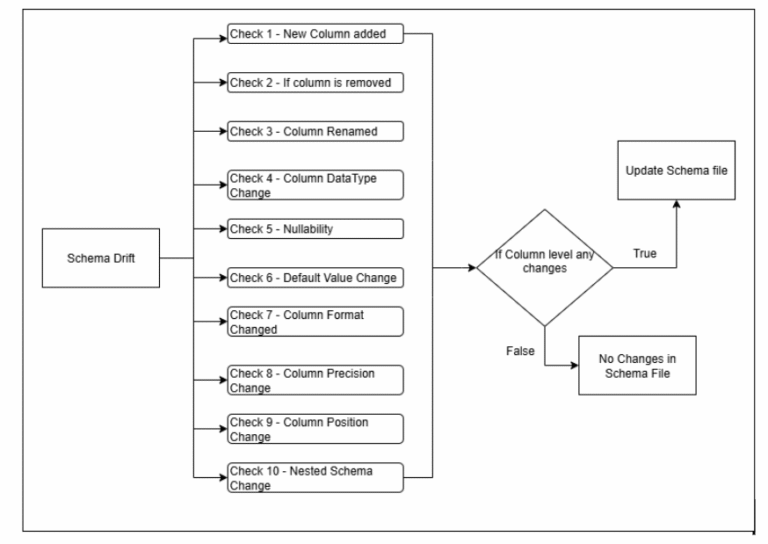
The key components that drive this system include:
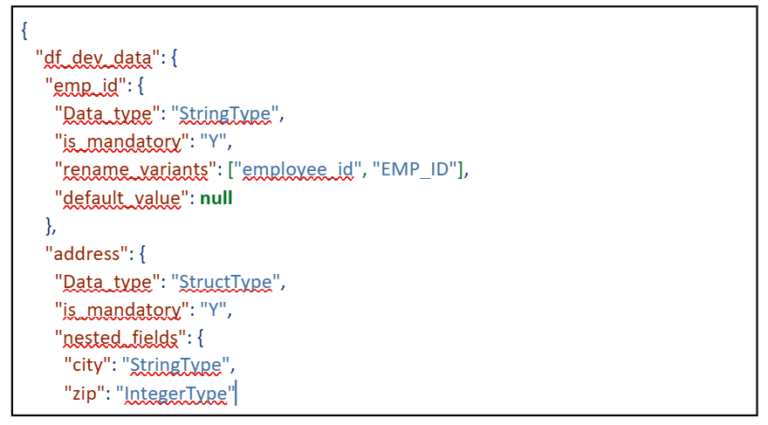
- Config File (config_file.json): The Schema Contract. This central JSON file is the heart of our system, serving as the single source of truth for the expected schema of your incoming data. For each dataset, it precisely defines attributes for every column, such as:
- column_name: The expected name of the field.
- type: The expected Spark SQL data type (e.g., StringType, IntegerType, DecimalType).
- nullability: Whether the column is expected to allow null values (Y or N).
- format: Optional, specifies expected data format (e.g., regex for dates, specific patterns).
- precision/scale: For numeric types, defines expected precision and scale.
- rename_variants: A list of alternative names this column might appear as in the source.
- default_value: The expected default or common value for the column.
- nested_schema: For complex types like structs, defines their internal sub-schema. This comprehensive definition allows for granular validation against actual incoming data.
Example config file structure looks like below:
- Source Data (e.g., CSV, Parquet, Delta): The Evolving Truth. These are the raw files continuously ingested into your data lake. Their schema is dynamically read and monitored at runtime. Whether stored in ADLS or S3, the system checks for structural changes. Any unexpected shift becomes input for drift detection.
- Delta Tables: The Immutable Drift Log. A dedicated Delta table is created for each monitored dataset. It stores versioned, immutable logs of all detected schema drifts. Each entry captures the field name, the datatype, the mandatory flag, and JSON comments. Delta Lake’s ACID features ensure reliable auditing and tracking.
- Databricks Notebooks – The Orchestration Engine. A central notebook controls all schema drift detection logic. It reads configurations, infers the source schema, and performs comparisons. It updates the Delta drift log tables based on identified changes. Modular design allows independent execution of each drift check.
At runtime, the Databricks environment executes the notebook. It dynamically compares the schema of the incoming source data against the meticulously defined contract in the config_file.json. Any differences found are then systematically logged into the corresponding Unity Catalog Delta tables, providing a clear, auditable trail of schema evolution.
Key Features of the Drift Detection System
- New Columns: It can accurately detect if a brand-new column appears in the incoming source data that was not previously specified or expected in your config.json.
- Removed Columns: The system identifies situations where an expected column, defined in your configuration, is no longer present in the incoming data stream.
- Renamed Columns: A sophisticated mechanism allows for the detection of renamed fields. This is achieved by leveraging rename_variants specified in your config for exact matches and by applying fuzzy string-matching logic (e.g., using a similarity threshold) for approximate name changes.
- Data Type Changes: It precisely identifies mismatches where a column’s actual data type in the source deviates from its expected type (e.g., a string becoming an integer, or a timestamp becoming a string).
- Nullability Check: The system flags cases where null values unexpectedly appear in fields that have been explicitly marked as non-nullable (is_mandatory: “Y”) in your configuration.
- Default Value and Format Check (Optional Business Rules Validation): Beyond structural changes, the framework can perform more granular data quality checks. It can validate if the most frequent value in a column aligns with a default_value specified in the config, or if string fields conform to a predefined Column_format (e.g., a regex pattern for dates or IDs).
- Nested Schema & Column Position (Optional Advanced Checks): For complex nested data structures (like structs or arrays of structs), the system can detect changes within these nested schemas (e.g., new sub-fields, removed sub-fields, or type changes in nested elements). It can also monitor and flag changes in the physical order of columns if that is a critical requirement for downstream systems.
A powerful aspect of this system is its configurability. You retain granular control over which checks are performed during any given run. This is achieved through simple JSON flags, often managed via Databricks widgets, allowing you to selectively enable or disable specific drift detections. For instance, setting {“new_column”: “True”, “Data_Type_change”: “True”} would only activate checks for new columns and data type mismatches, offering flexibility for testing or specific operational needs.
To illustrate the practical application of our schema drift detection framework, let’s take a closer look at three common and critical types of schema changes, examining how the system handles each with precision.
1. New Column Detection
Problem: A new column unexpectedly appears in the source data file, which was not previously defined or anticipated in your config.json.
How it’s handled: The system employs a straightforward yet effective comparison strategy:
- It first extracts the complete list of column names present in the incoming source DataFrame.
- Concurrently, it gathers the list of expected column names from your config.json.
- The core logic then iterates through the source columns. For each column, it checks if it exists within the set of expected columns from the configuration.
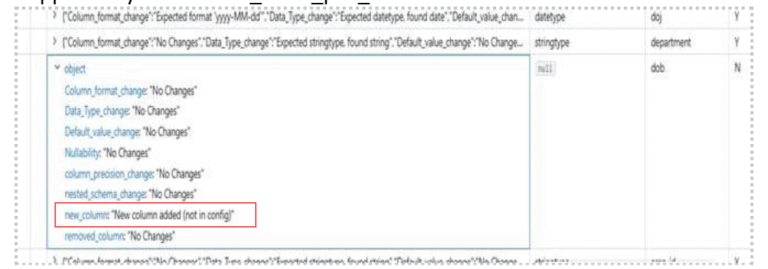
- If a column is found in the source data but is not present in your configuration, it is immediately flagged. A new entry is prepared for the schema drift log, marking this field as “Newly Added.” This entry also captures the inferred data type of the new column from the source.
Sample Output in Delta Log Table (Conceptual): When a new column is detected, an entry similar to this would appear in your schema_table_pos_data Delta table:
2. Renamed Column Detection
Problem: A column name in the source data has changed (e.g., start_date becomes week_beginning_date).
How it’s handled: The framework utilizes a sophisticated matching logic to identify renamed columns:
- rename_variants from Config: The config.json contains rename_variants for each column (e.g., product_ID → [“prod_id”, “item_code”]).
If a column is missing, the system first checks whether its variants exist in the source.
This provides a direct and explicit mapping for known column renames.
- Fuzzy String Matching: If no variant matches, the system applies fuzzy matching to compare missing vs. unexpected columns. A high similarity score (e.g., >70%) indicates a likely rename. This helps detect renames not explicitly listed in the config.
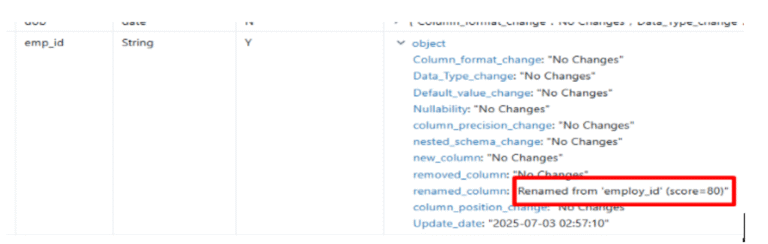
- Rename Confirmation & Logging: Once a rename is confirmed, the system logs the old and new names. The original config column is marked as “renamed” with full traceability.
Sample Output in Delta Log Table (Conceptual): If customer_id was renamed to client_identifier, the log might show:
3. Data Type Change
Problem: The expected data type of a column, as defined in your config.json, is different from the actual data type inferred by Spark from the source data (e.g., an int field suddenly contains string values, or a string field now has timestamp data).
How it’s handled: The system performs a direct and precise comparison of data types:
- It reads the live Spark schema of the incoming source data (CSV in this example). Spark’s schema inference provides the actual data types of all columns.
- For each field, the system then compares its inferred data type with the Data_type specified for that very same field in your config.json.
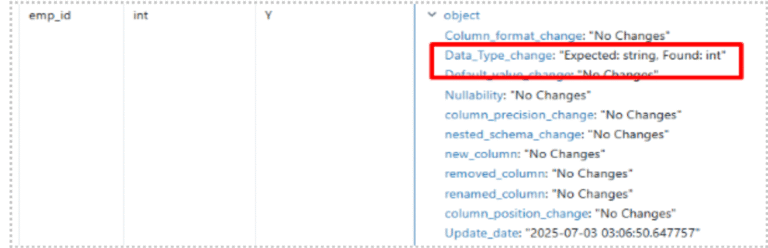
- If any mismatch is found (e.g., StringType in config vs. IntegerType in source), the difference is immediately logged. The drift table entry for that column is updated, and the Data_Type_change flag is set to “Yes,” indicating both the expected and the found data type.
Sample Output in Delta Log Table (Conceptual): If Column changed from StringType to IntegerType:
Here are some additional robust checks supported by the system:
- Nullability Check:
Problem: A column that is explicitly marked as mandatory or non-nullable in your config.json begins to contain NULL values in the incoming source data.
How it’s handled: The system performs a count of null values for columns designated as non-nullable in the configuration. If any nulls are detected, it is flagged as a “Nullability Violation.”
- Removed Columns:
Problem: A column that is defined and expected to be present according to your config.json is no longer found in the incoming source data.
How it’s handled: This check is essentially the inverse of the “New Column Detection.” The system compares the set of columns expected by the configuration against those present in the source. Any column that exists in the configuration but is absent in the source is flagged as “Removed.”
- Column Format Check:
Problem: Data within a column deviates from a specified format, even if the data type remains correct. For instance, a date_string column might still be a StringType, but its values might change from YYYY-MM-DD to DD/MM/YYYY.
How it’s handled: If a Column_format (e.g., a regex pattern for specific string structures or date formats) is provided in the config.json, the system samples a subset of the column’s values and validates them against this format. Any values that do not conform are flagged, indicating a “Column Format Change.”
- Default Value Check:
Problem: A column’s “default” or most frequently occurring value in the source data deviates from a default_value specified in your config.json.
How it’s handled: The system identifies the most common or a set of distinct values in the source column and compares them against the default value from the configuration. If a mismatch is found, it’s logged as a “Default Value Change,” providing insight into data content shifts.
- Precision Drift:
Problem: For numeric columns, particularly those with DecimalType, the precision (total number of digits) or scale (number of digits after the decimal point) changes in the source data compared to the configuration.
How it’s handled: The system directly inspects the DecimalType properties (precision and scale) from Spark’s inferred schema of the source data and compares these values against the precision attribute defined in your config.json. Any discrepancy is flagged as a “Precision/Scale Change.”
- Nested Schema Drift:
Problem: For complex data types like StructType (which represent nested JSON objects or records), changes occur within their internal sub-fields (like new sub-fields being added, existing ones being removed, or their data types/nullability changing).
How it’s handled: It meticulously compares the expected nested_schema defined in your configuration against the actual structure of the nested data in the source. Any additions, removals, or modifications within the nested fields are logged as “Nested Schema Changes.”
- Column Order Check:
Problem: The physical order of columns in the source data changes. While most modern data processing engines (like Spark) are schema-on-read and rely on column names, not order, some legacy systems, direct file consumers, or specific reporting tools might be sensitive to column position.
How it’s handled: The system compares the ordered list of column names as they appear in the source DataFrame’s schema with the expected order implied by your config.json. If the order deviates, a “Column Order Change” is flagged, indicating that columns are out of their expected sequence.
Schema Drift Log and Audit Structure:
All detected drifts are logged into dedicated Delta tables (e.g., schema_table_pos_data), with one table per monitored dataset. These tables maintain an immutable, versioned record of schema changes, ensuring complete traceability for governance, debugging, and lineage tracking.
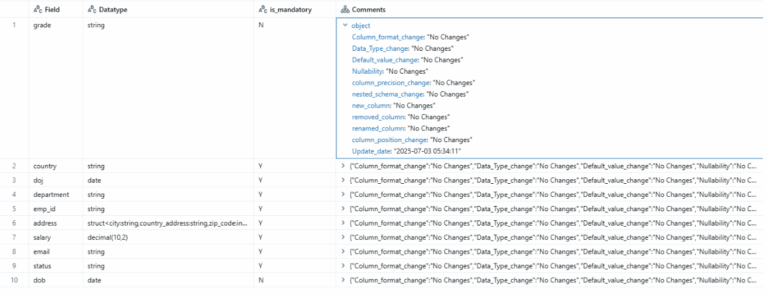
This structured output makes it straightforward to query, report on, and visualise schema changes over time, offering unparalleled visibility into your data assets’ evolution.
Advantages:
- Fully Configurable: Entire behaviour is controlled through an external JSON config file.
- Modular Checks: Ten independent drift checks can be enabled or disabled as needed.
- Delta-Based Logging: Delta Lake stores drift results with full ACID guarantees and versioning.
- Extendable: New drift checks can be added easily due to the modular notebook design.
- Fuzzy Rename Support: Fuzzy matching and rename_variants reliably detect column renames.
- Proactive Issue Detection: Early detection prevents downstream failures and data quality errors.
- Enhanced Data Trust: Transparent logging ensures confidence in data integrity.
- Reduced Manual Effort: Automation removes the need for manual schema validation.
Conclusion:
Schema drift, a common challenge in modern data pipelines, is no longer a silent disruptor. This Databricks-based framework provides a proactive, automated, and configurable solution that logs every schema change and ensures data integrity. Its modular design allows easy customisation, integration with alerts or dashboards, and reliable management of evolving data structures.