

Organizations need data pipelines that are not only scalable and reliable but also simple to manage and evolve as business needs grow. Within the Databricks ecosystem, there are two main ways to achieve this: Delta Live Tables (DLT) and Jobs & Workflows.
Delta Live Tables offers a fully managed, declarative framework that simplifies the creation and maintenance of ETL pipelines, automating much of the complexity involved in data engineering. On the other hand, Jobs & Workflows represent a more traditional, hands-on approach, where custom Py provides a fully managed, declarative framework that streamlines the creation and maintenance of ETL pipelines, automating much of the complexity associated with. This approach automates much of the complexity associated with Spark or SQL code, which Spark or SQL code is orchestrated and managed manually through Databricks Jobs.
In this blog, we’ll dive into a detailed comparison between these two approaches, exploring how they differ in usability, flexibility, and operational efficiency to help you decide which one best fits your data engineering needs in Databricks.
Delta Live Tables: Declarative Pipelines Made Simple
Delta Live Tables (DLT) abstracts away most of the operational complexity of building pipelines. Instead of coding orchestration, retries, and error handling, you declare what your tables should look like, and Databricks handles the rest.
Key benefits of DLT:
- Write transformations using @dlt.table or @dlt.view.
- Automatically manage dependencies between tables.
- Built-in data quality rules with EXPECT.
- Schema evolution is handled automatically.
- Out-of-the-box lineage tracking and monitoring UI.
Jobs & Workflows: The Manual Approach
Before DLT, most pipelines in Databricks were built with notebooks + PySpark/SQL code, scheduled through Jobs or chained using Workflows. This method gives you full control, but it requires more engineering effort to maintain.
Key benefits of Jobs/Workflows:
- Maximum flexibility — you can write any PySpark/SQL code.
- Integrates with external systems (APIs, third-party libraries, etc.).
- Control over custom orchestration logic.
- Familiar with teams already using PySpark-based ETL.
The tradeoff is that you need to handle schema changes, retries, logging, and monitoring yourself.
Simple Example: PySpark Pipeline and DLT Pipeline
Imagine we want to process raw user clickstream logs into a clean silver table.
Manual Pipeline (Jobs + PySpark)
					from pyspark.sql import SparkSession
from pyspark.sql.functions import col, to_date
spark = SparkSession.builder.appName("ManualPipeline").getOrCreate()
# Read raw logs
raw_df = spark.read.json("/mnt/raw/clickstream")
# Transform
clean_df = (raw_df
            .withColumn("event_date", to_date(col("timestamp")))
            .filter(col("event_type").isNotNull()))
# Write to silver table
(clean_df.write
    .format("delta")
    .mode("overwrite")
    .saveAsTable("clickstream_silver"))
Here, you must schedule this notebook as a Job and manage orchestration yourself.
Delta Live Tables (DLT)
					import dlt
from pyspark.sql.functions import col, to_date
@dlt.table(
  comment="Bronze - raw clickstream logs"
)
def clickstream_bronze():
    return spark.readStream.format("json").load("/mnt/raw/clickstream")
@dlt.table(
  comment="Silver - cleaned clickstream data"
)
@dlt.expect("valid_event_type", "event_type IS NOT NULL")
def clickstream_silver():
    bronze = dlt.read_stream("clickstream_bronze")
    return bronze.withColumn("event_date", to_date(col("timestamp")))
DLT handles orchestration, monitoring, quality checks, and streaming ingestion automatically.
Comparison:
Feature | Delta Live Tables (DLT) | Jobs & Workflows (Manual) |
Development Style | Declarative (@dlt.table) | Imperative (PySpark/SQL) |
Orchestration | Automatic | Manual via Jobs/Workflows |
Monitoring | Built-in DLT UI | Job run logs |
Data Quality | EXPECT rules | Custom code required |
Schema Evolution | Automatic | Manual handling |
Flexibility | Limited to DLT features | Full PySpark/SQL control |
Use Case Fit | Standardized ETL, ingestion of many tables | Complex/custom transformations |
Which One Should You Choose?
- Delta Live Tables (DLT) if you want faster development, less maintenance overhead, and reliable pipelines with built-in quality checks. Perfect for scaling ingestion across hundreds of tables.
- Jobs & Workflows: if you need custom ETL logic, complex orchestration, or integration with external systems beyond DLT’s capabilities.
Two different pipeline UIs in Databricks:
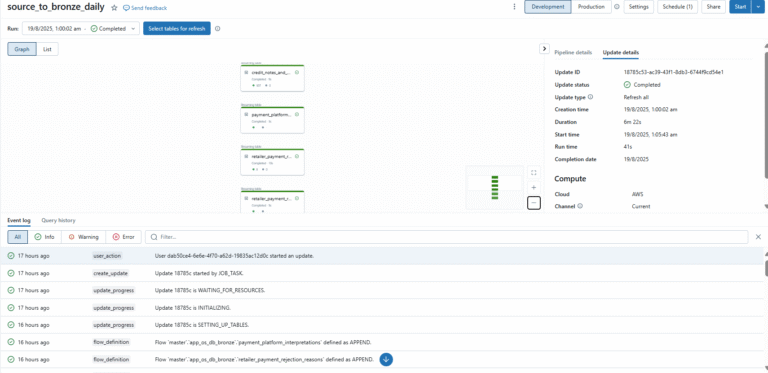
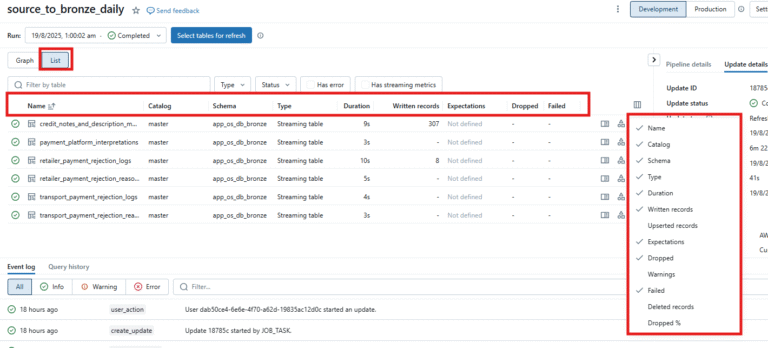
Delta Live Tables (DLT) Pipeline UI
- Purpose → Designed for managing data pipelines (ingestion + transformation) declaratively.
- Cluster Type → Uses DLT-managed job clusters (continuous or triggered). You don’t pick clusters manually.
- UI Sections →
- Graph View → Great for understanding data flow/dependencies (like a lineage diagram).
- List View → Great for operational monitoring (row counts, schema changes, expectations, errors).
- DLT logs include schema tracking, Auto Loader, expectations, quality checks, and SCD handling.
- You can drill down to per-table lineage & metrics.
- Focus → Monitoring datasets (tables/views), schema evolution, quality rules.
- Automation → DLT handles retries, recovery, and scaling automatically.
Graph View:
List View:
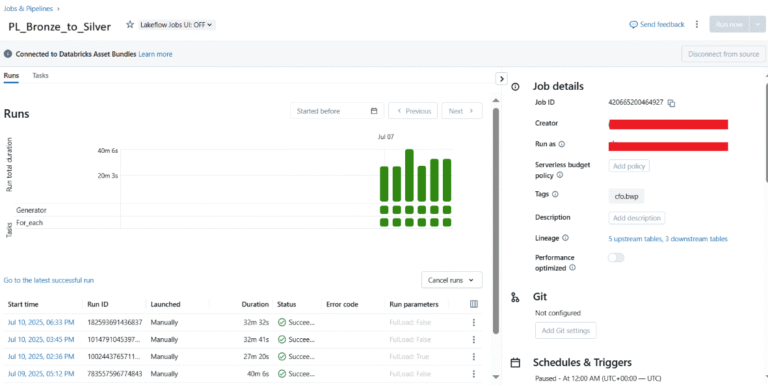
Workflow Job UI
- Purpose → General-purpose orchestration of tasks (not limited to data pipelines). Can run notebooks, JARs, Python scripts, SQL queries, or even trigger a DLT pipeline.
- Cluster Type → Uses job clusters or all-purpose clusters (your choice). Each task can run on its own cluster or a shared one.
- UI Sections →
- Shows run view with green squares (success/failure per task).
- Tasks like Source_to_Bronze → Bronze_to_Silver are listed sequentially.
- Logs focus on task execution (duration, status, error codes), not dataset lineage.
- Focus → Monitoring workflow execution (scheduling, task dependencies, parameters, alerts).
- Automation → You control scheduling, retries, and notifications.
Conclusion:
Databricks provides two great options for building data pipelines, Delta Live Tables (DLT) and Jobs & Workflows, and both have their own advantages. DLT focuses on simplicity and automation, making it easier to build reliable pipelines with minimal effort. Jobs & Workflows, on the other hand, give you more flexibility and control, which is useful for handling complex or customized logic.
In most cases, teams use a mix of both: DLT for standard data ingestion and transformations, and Jobs & Workflows for more specialised tasks. The choice really depends on your needs to choose DLT when you want automation and scalability, and use Workflow when you need more customization and control.